Every workshop project I’ve written about on this blog started with the same complaint, more or less: something in my setup was annoying me enough that building a fix felt easier than living with it. This one’s no different, except this time the annoyance wasn’t a bug in JARVIS — it was standing in front of a rolling tool chest, absolutely certain I owned the M4 screws I needed, with zero idea which of six drawers they were actually in.
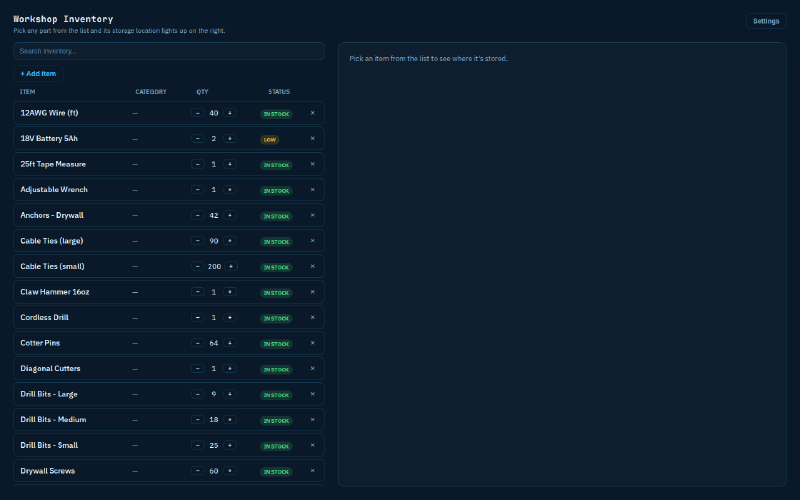
That’s the whole premise of Workshop Inventory: a self-hosted app that knows your actual storage — your toolboxes, pegboards, cabinets, and whatever custom thing you’ve bolted together over the years — and tells you exactly which drawer, hook, or bin something is in when you search for it. If you want to go further, it’ll light up the real drawer too. I started it as a tool to solve my own problem. Somewhere around a dozen releases in, it turned into something I’m actually packaging to sell, which has been its own kind of interesting.
Why I didn’t just use something that already exists#
Before writing a line of code I went and looked at what’s already out there — InvenTree, Part-DB, Binner, ShareMyToolbox, BinManage, Sortly. All reasonable tools, all solving adjacent problems. None of them do the one thing I actually wanted: an illustrated, interactive view where you search a part and see which actual drawer lights up, shaped like your actual storage. InvenTree in particular is a genuinely good piece of software, but it’s built for manufacturing and BOM management — it assumes a very different mental model than “I have a red rolling chest with six drawers and a pegboard zip-tied to the side of it.” Rather than fight someone else’s data model into shape, I built the location-first version from scratch.
What it actually does#
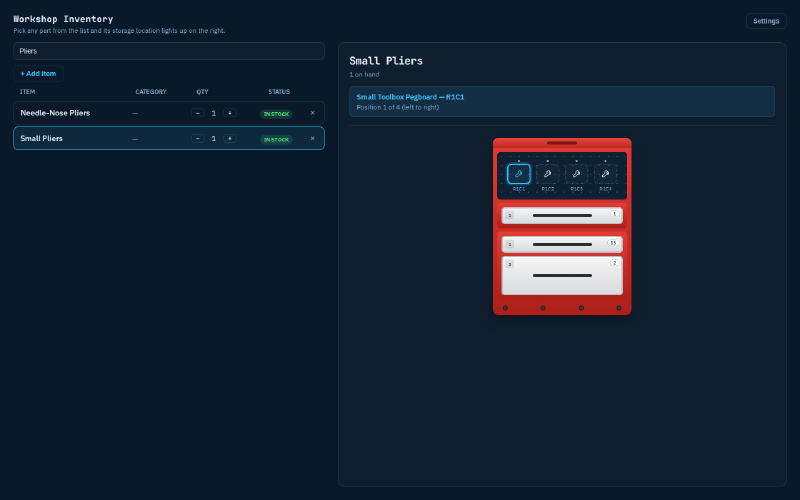
The core loop is deliberately boring: you model your real storage — a toolbox, a pegboard, a parts cabinet, a cupboard, anything — assign items to specific slots, then search. Click a result and the exact slot highlights on screen. That’s it. That’s the whole value proposition, and I was careful not to let it get buried under feature creep, because the illustrated-location idea was the entire reason to build this instead of grabbing something off the shelf.
Everything past that core loop exists because real workshops kept teaching me my first model was too simple.
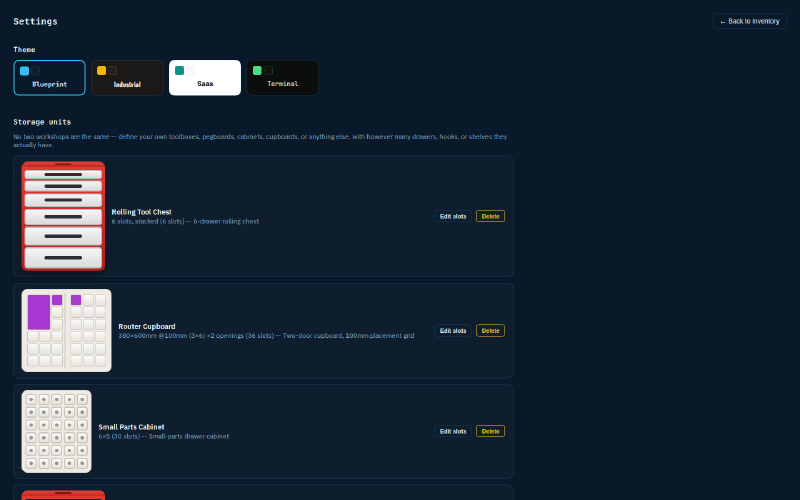
Storage that actually looks like storage. My first cut modeled every unit as a uniform grid — rows times columns, done. That lasted about one release before I tried to describe my own toolbox and hit a wall: a single wide drawer, then a row of three smaller bins, then another wide one, with a pegboard mounted on top and a cabinet bolted underneath. Real storage is jagged. It’s built up in pieces over years, not purchased as one uniform unit. So the layout model became per-row drawer counts instead of a fixed grid, with any unit able to carry a topbox, a bottom cabinet, or side lockers as fully independent units that just happen to be attached to a parent — a wizard walks you through building it row by row, with a live preview, and quick-start templates for the common shapes (pegboard, cabinet, cupboard, toolbox) so you’re not starting from a blank page every time.
Two ways to describe the same drawer. Some storage is naturally “a drawer, another drawer, a row of three bins.” Other storage — a pegboard’s hole spacing, a cupboard’s actual opening dimensions — is better described in real millimeters than in an arbitrary row count. So a unit can use either a rows-of-drawers layout or a dimensioned grid, where you enter an opening’s real width and height and it’s divided into a placement grid at whatever cell size makes sense. Place an item by giving its actual footprint in millimeters, rounded up to whole cells so a 260mm-tall part never gets squeezed into a 200mm space, and it renders as one merged block instead of a scatter of identically-tinted cells. A drawer that’s too big for one item can even get its own Gridfinity-style interior grid, which is the same dimensioned-grid machinery applied one level deeper, rather than a second thing I had to build.
Fixing the shape after the fact, without starting over. Early on, if you attached a cabinet to the wrong side of a toolbox, your only option was deleting the whole unit and rebuilding it — losing every item assignment in the process. That got fixed properly: any unit can be reattached to a different parent or position, two attachments can swap places in one click, and if you decide a different piece should be the physically central one (say, a drawer that should sit between a pegboard and a cabinet instead of off to the side), there’s a “make main” operation that restructures the whole assembly without deleting or moving a single item.
Knowing who has the drill. Mark a category as “can be checked out,” and any item in it gets a simple check-out/return flow — pick a name, and the item shows “out with Dave” until it comes back, with history kept per item. It doesn’t touch quantity or location, it just answers “who has this right now,” which turns out to be a genuinely common workshop question that has nothing to do with inventory counts.
Photos, CSV, and the unglamorous stuff. Up to three photos per item, shrunk client-side before upload so a phone photo doesn’t bloat the database. Full CSV export and a preview-before-you-commit import, so moving a spreadsheet’s worth of parts in doesn’t mean retyping everything by hand. None of this is exciting to describe, but it’s the difference between a tool you actually use and one that stays a cute demo.
The part that ties back to everything else on this blog#
If you’ve read the JARVIS posts, you already know where this is going. Workshop Inventory ships with a generic MCP server — not tied to my own assistant specifically, just a thin, authenticated HTTP wrapper over the same API the web UI uses. Point any MCP-capable LLM at it with a scoped token and it can answer “where are the M6 bolts,” tell you what’s running low, or adjust stock on request. JARVIS has had this wired in since its own v162, and a release later, it got even better: item photos pulled live from the inventory now help JARVIS’s vision agent actually spot a tool sitting on a workbench camera, matching the frame against whatever photos you’ve attached to that item. Two projects I built independently for different reasons ended up genuinely useful to each other, which is a nicer outcome than I was expecting when I started either one.
The integration only works because of a decision I made early and stuck with: the core app never knows or cares that JARVIS, or any AI, exists. It’s a REST API with scoped tokens — read-only, read-write, or admin — and the MCP server is just one more authenticated client sitting on top of it, same as the web GUI or a curl script would be. If you never touch the AI side at all, the app is complete and useful entirely on its own.
Why self-hosted, and why that’s turning into the whole pitch#
I wasn’t planning to sell this when I started it. It was a tool for my own workshop, and I kept iterating on it because I kept finding my own gaps — the drawer-count bug that turned out to trace all the way back to a mislabeled mockup, the day I couldn’t figure out how to move a drawer from the top of an assembly to the middle, the afternoon I realized the inventory list just silently stopped showing anything past the 25th item with no way to reach the rest. Every one of those came from actually using the thing, not from a feature wishlist.
At some point, “clean this up enough that someone else could run it” started to feel like a reasonable next step, and the reasoning that got me there is the same reasoning that runs through most of what I write about here: I don’t want another subscription, and I don’t want my workshop’s contents sitting in someone else’s database. So that became the whole design constraint for the sellable version. It runs entirely on your own hardware — a NAS, a spare machine, whatever’s already running Docker in your house — with one install command and nothing that phones home. One-time purchase, not a subscription. Full source included, not a black-box container pulled from a registry, specifically so a buyer can inspect it, keep running whatever version they downloaded indefinitely, and never be at the mercy of a vendor deciding to shut something down or change the pricing later.
I’ll be upfront about the other side of that tradeoff, because I’d rather say it here than have someone find out after buying: this is a one-person hobby project, not a company. That means fast, genuinely personal attention when something needs fixing, and it also means no support team, no guaranteed response time, and no fixed release schedule. If that’s not the kind of software relationship you want, this probably isn’t the right purchase, and I’d rather be clear about that upfront than oversell it.
Where it stands right now#
Nineteen releases in, the app covers the full loop end to end: build any storage shape you actually own, assign items down to the drawer or cell, search and locate them visually, track who’s borrowed what, pull photos, import and export a catalog, and hand read or write access to an AI assistant if you want one in the loop. It’s responsive enough to use from a phone standing in front of the actual shelf, which matters more than I expected it to — most of the time I’m not at a desk when I actually need to find something, I’m standing in the garage holding a half-finished project and one free hand.
The packaging work — an installer script, a license, buyer-facing docs, a support FAQ that’s honest about being a one-person operation — is done. What’s left is the actual storefront listing going live. When it does, I’ll update this post with the link. If you’ve ever stood in front of your own pile of drawers knowing you own the part and having no idea where, this is going to be for you.